
Introduction
Windows 11 was marketed as a modern and productivity-focused operating system for both consumers and businesses. However, many organisations now describe their experience as “enshittification” — a gradual decline in usability, control, and performance due to forced updates, ads, telemetry, and unnecessary features. This is often referred to as the Enshittification of Windows 11.
In the business world, where stability and efficiency matter more than visual polish, Windows 11 has created real operational challenges. This article explains what enshittification means in the context of Windows 11 and how businesses are practically dealing with the enshittification of Windows 11.
What Is “Enshittification” in Windows 11?
Enshittification refers to a platform becoming worse over time as user needs are deprioritised in favour of monetisation, data collection, and ecosystem lock-in.
In Windows 11, businesses commonly point to:
- Forced updates with limited control
- Built-in ads and promotions
- Heavy telemetry and data collection
- Increased hardware requirements
- Reduced customisation compared to Windows 10
For enterprises, these changes translate directly into downtime, support costs, and user frustration.
Major Windows 11 Issues Businesses Face
1. Forced Updates Disrupt Workflows

Windows 11 frequently installs updates automatically, sometimes restarting systems outside business hours policies. This causes:
- Unexpected downtime
- Software incompatibility after updates
- Increased IT support tickets
2. Ads and Consumer Features in a Business OS
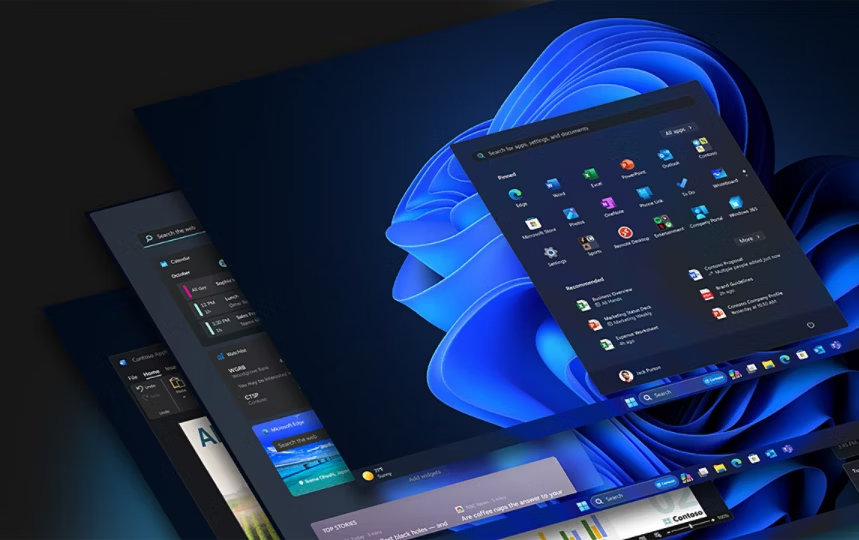
Despite being used in professional environments, Windows 11 includes:
- Start menu recommendations
- Microsoft service promotions
- Bing integration and widgets
Many organisations view this as unprofessional and distracting.
3. Performance Overhead on Older Hardware
Windows 11’s strict hardware requirements (TPM 2.0, newer CPUs) force businesses to:
- Upgrade hardware earlier than planned
- Run Windows 11 on unsupported systems with workarounds
- Face slower performance on mid-range devices
4. Reduced User and Admin Control
Compared to Windows 10, Windows 11 limits:
- Registry-based customisation
- Local account usage
- Group Policy flexibility in some editions
This makes centralised IT management more complex.
How Businesses Are Dealing With Windows 11 Enshittification
1. Delaying or Avoiding Windows 11 Upgrades
Many organisations are:
- Staying on Windows 10 until end-of-support
- Using Long-Term Servicing Channel (LTSC) versions
- Testing Windows 11 only on non-critical systems
This buys time while evaluating alternatives.
2. Aggressive Debloating and Hardening
IT teams remove unnecessary features using:
- Group Policy Editor
- PowerShell scripts
- Endpoint management tools
Common actions include:
- Disabling ads and widgets
- Turning off telemetry
- Removing bundled consumer apps
3. Using Enterprise and Pro Editions Only
Businesses increasingly avoid Home editions and standardise on:
- Windows 11 Pro
- Windows 11 Enterprise
These versions offer:
- Better update control
- Group Policy management
- Reduced consumer-focused features
4. Virtualisation and VDI Solutions
Some companies isolate Windows 11 using:
- Virtual desktops (VDI)
- Remote Desktop Services
- Cloud PCs
This limits the impact of OS-level issues on physical machines.
5. Exploring Alternatives
A growing number of businesses are:
- Migrating non-critical roles to Linux
- Using macOS for creative or development teams
- Moving workflows to browser-based SaaS tools
This reduces dependency on Windows entirely.
Is Windows 11 Still Viable for Businesses?
Despite its issues, Windows 11 is still viable if properly managed. Businesses that:
- Disable unnecessary features
- Control updates tightly
- Use enterprise tools
can maintain acceptable productivity. However, unmanaged deployments often lead to frustration and inefficiency.
Final Thoughts
The enshittification of Windows 11 highlights a broader shift in operating systems prioritising ecosystems over users. Businesses are responding not by blind adoption, but by delaying upgrades, hardening systems, and diversifying platforms.
For now, Windows 11 is manageable — but only with deliberate planning and strong IT controls.