
You go to bed with a full charge and wake up to find a big chunk of your battery gone, even though you did not touch your phone. An idle phone should lose only a small amount overnight. This guide is for Android phone owners, and it helps you find what is using power while the screen is off and how to stop it without losing alarms or important calls.
Quick Answer: Open Settings > Battery > Battery usage in the morning and look for apps with high usage overnight. Set those apps to Restricted or Optimised in their battery settings. If you have weak mobile signal at night, turn on Wi-Fi or use Airplane mode with Wi-Fi switched back on; alarms still work.
Tested on: Iphone 17 Air
Why This Happens
A phone with its screen off should mostly sleep. Overnight drain usually means something is keeping it awake. Common causes are:
- Apps running in the background. Some apps sync, track location or check for updates repeatedly.
- Weak mobile signal. When reception is poor, the phone uses more power searching for and holding onto a signal.
- Constant syncing. Email, cloud photos and other accounts may sync large amounts of data at night.
- Location services. Apps allowed to use location all the time can wake the phone often.
- An ageing battery or a buggy update. Older batteries hold less charge, and some updates cause higher drain until they are fixed.
Fix 1: Find the Apps Using Battery Overnight
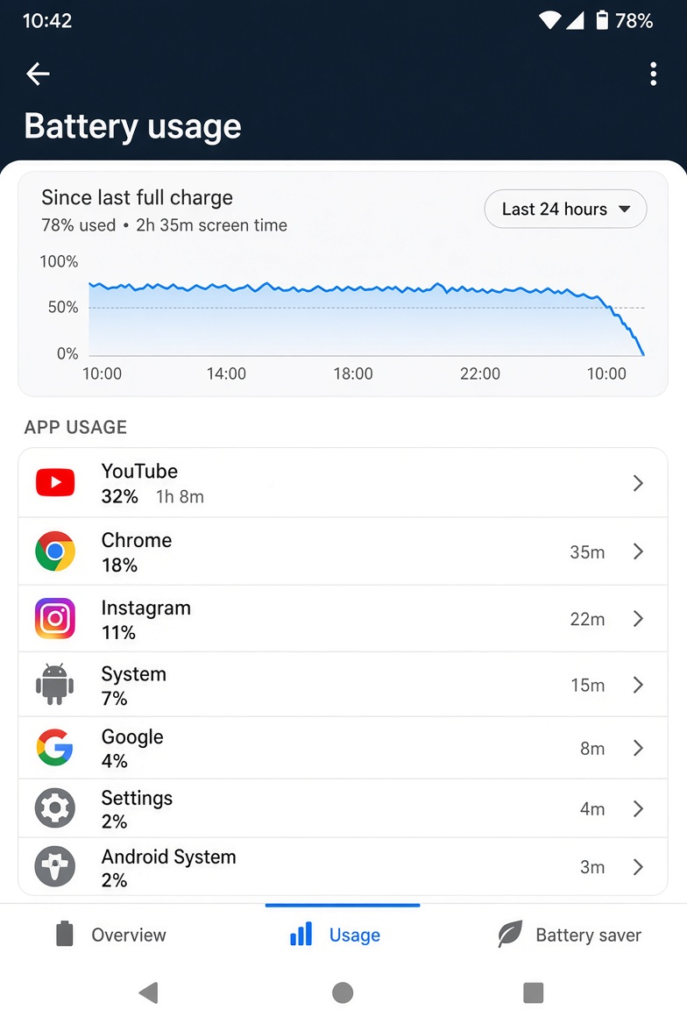
- In the morning, open Settings > Battery.
- Tap Battery usage (on some phones, Battery usage by app or a usage graph).
- Look at the period while you slept and note apps with high usage.
- Tap an app to see whether it was mostly used in the background.
Fix 2: Restrict Battery-Hungry Apps
- Go to Settings > Apps and select an app you found in Fix 1.
- Tap Battery or App battery usage.
- Choose Optimised, or Restricted for apps you do not need in the background.
- Repeat for other heavy apps.
Avoid restricting messaging, alarm or health apps you rely on at night.
Fix 3: Deal With Weak Signal at Night
- If your bedroom has poor mobile signal, connect to Wi-Fi so the phone does not keep searching.
- Turn on Wi-Fi calling if your carrier supports it, so calls still reach you over Wi-Fi.
- Or turn on Airplane mode at night, then turn Wi-Fi back on. Alarms still ring in Airplane mode.
Fix 4: Use Bedtime or Sleep Modes
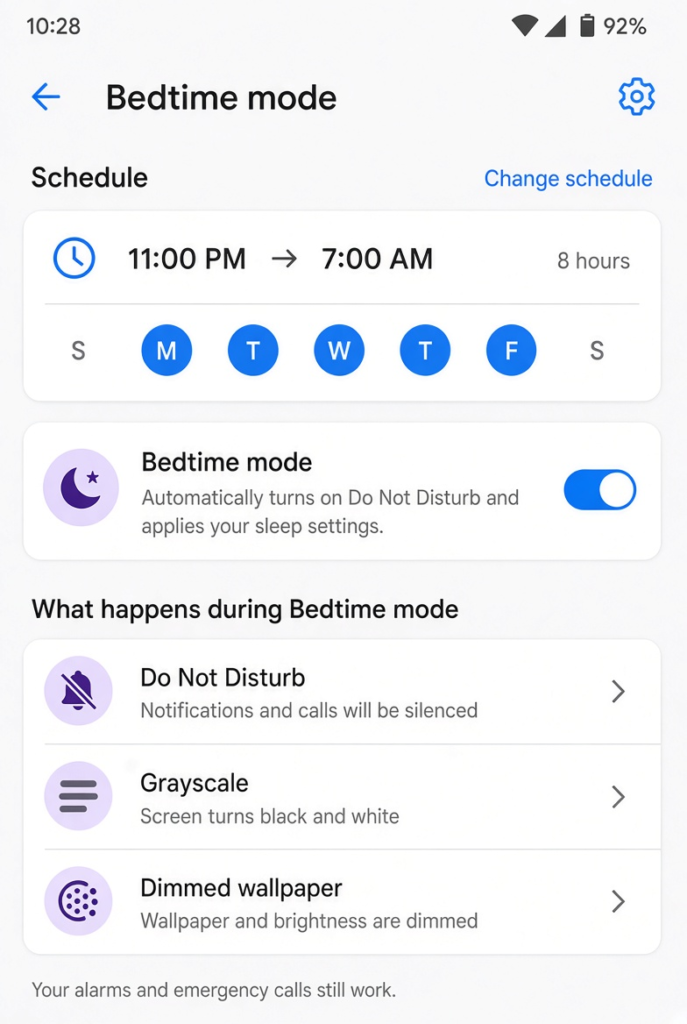
Many Android phones have bedtime features that reduce activity overnight. Search your Settings for Bedtime mode, Modes or Routines. Set a schedule that turns on Do Not Disturb and, if available, options such as grayscale or reduced background activity. Allow calls from favourite contacts so you do not miss emergencies.
Fix 5: Reduce Background Sync
- Open Settings > Passwords & accounts (or Accounts).
- Review each account and turn off sync for items you do not need, such as contacts from old accounts.
- In apps like cloud photo backup, set uploads to happen only while charging or on Wi-Fi.
Fix 6: Limit Location Access
- Open Settings > Location > App location permissions.
- Look at apps with Allowed all the time.
- Change apps that do not need it to Allow only while using the app.
Fix 7: Update Apps and the System
Open the Play Store and update all apps, then check Settings > System > System update (or Software update). Battery bugs are often fixed in updates.
Fix 8: Check Battery Health
Some phones show battery health in Settings > Battery or in the manufacturer’s support or diagnostics app. If the battery is badly worn, no setting will fully fix the drain, and a battery replacement from an authorised service centre is the real solution.
Still Draining? Try a Night in Safe Mode
Safe mode starts Android with only the apps that came with your phone. On many phones, you enter it by pressing and holding the power button, then pressing and holding Power off until a Safe mode option appears. The exact method varies by brand, so check your phone maker’s help pages if it does not appear. Leave the phone in safe mode overnight. If the drain is much lower, a downloaded app is the cause. Restart normally to leave safe mode, then remove recently installed apps one at a time.
Small Overnight Habits That Help
- Turn off Always On Display at night, or set it to show only when you tap the screen.
- Close navigation, fitness tracking or video apps before bed so they are not running in the background.
- Keep the phone away from very warm places, such as under a pillow, as heat increases battery drain and wear.
My Experience
In my experience, checking the Battery Usage section is the best first step when an Android phone loses charge overnight. It helps identify apps that continue running in the background even when the screen is off. Restricting unnecessary apps and reducing background activity can make a noticeable difference. I would also recommend checking mobile signal strength, as poor reception can increase battery consumption while you sleep. If the problem continues, updating apps and Android may help resolve software-related issues. These simple checks can improve overnight battery life without affecting essential features such as alarms and important calls.
Which Fix Should You Try First?
Check battery usage in the morning and restrict the apps you find. That alone fixes many cases. If no app stands out, look at mobile signal in your bedroom and use Wi-Fi or Airplane mode overnight. Bedtime modes, fewer synced accounts and tighter location permissions reduce drain further, and an update or battery check covers the rest.
Frequently Asked Questions
How much battery should an Android phone lose overnight?
An idle phone should lose only a small amount overnight. Much larger drops usually mean an app, weak signal or syncing is keeping it awake.
Do alarms work in Airplane mode?
Yes. Alarms set in your clock app work in Airplane mode, so you can use it overnight to save battery without missing your alarm.
Is it bad to charge my phone overnight?
Modern phones manage charging to protect the battery, and many have adaptive or optimised charging options. Turning these on helps reduce wear from overnight charging.
Related: Android notifications late or missing | Play Store stuck on Download pending